Physical Address
304 North Cardinal St.
Dorchester Center, MA 02124
Physical Address
304 North Cardinal St.
Dorchester Center, MA 02124

The Autel MaxiCom Ultra Lite is a high-end professional diagnostic scanner positioned as a direct alternative to the MaxiSys Ultra, MS919, and MS909. It targets independent repair shops, mobile mechanics, and seasoned automotive technicians who need OEM-level functionality without the premium price tag. Its primary innovation lies in providing two years of free software updates, a feature that typically costs $2,500 on other models, and integrating the same Topology 2.0 system and Motor TruSpeed Repair tools found on the flagship MaxiSys Ultra. Powered by an Android 10.0 operating system and an Exynos 8895V octa-core processor, this scanner delivers fast diagnostics for over 160 brands and 15,000+ vehicle models globally. For more background on Autel’s product ecosystem, you can visit Autel’s official website.
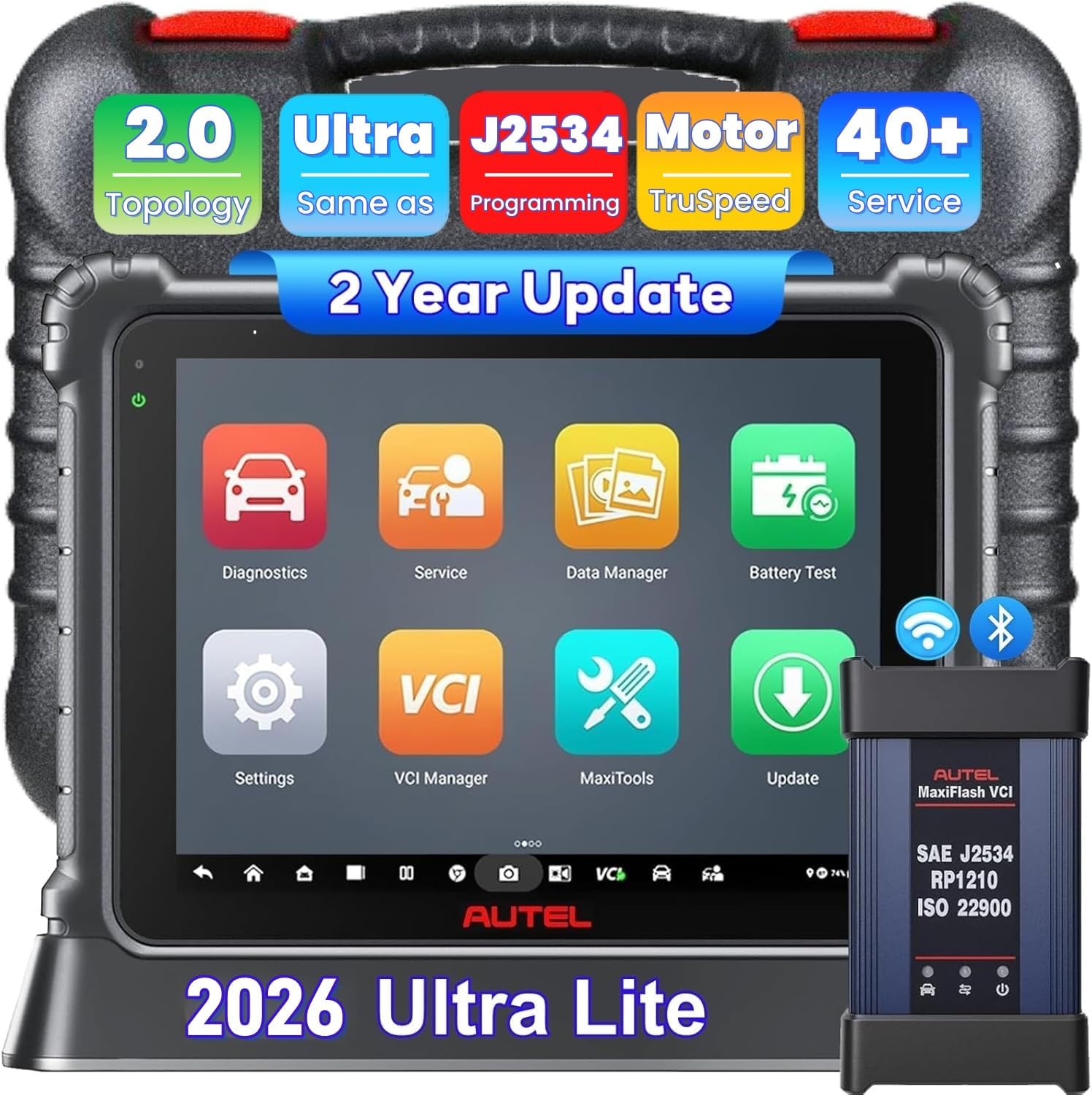
The Autel MaxiCom Ultra Lite is packed with features that make it a compelling choice for professionals. Here are the highlights:
| Specification | Detail |
|---|---|
| Operating System | Android 10.0 (upgraded from Android 7.0) |
| Processor | Exynos 8895V Octa-core |
| RAM / ROM | 4GB / 256GB |
| Screen | 12.9-inch TFT-LCD, 2732 x 2048 resolution |
| Battery | 18,000mAh |
| Cameras | 16MP rear, 5MP front |
| Connectivity | Dual Wi-Fi, USB, Bluetooth |
| Vehicle Coverage | 15,000+ vehicles, 160+ brands |
| Weight | Approximately 3.5 lbs |
For a deeper comparison with other top-tier scanners, check our Autel MS919 vs Ultra Lite comparison.
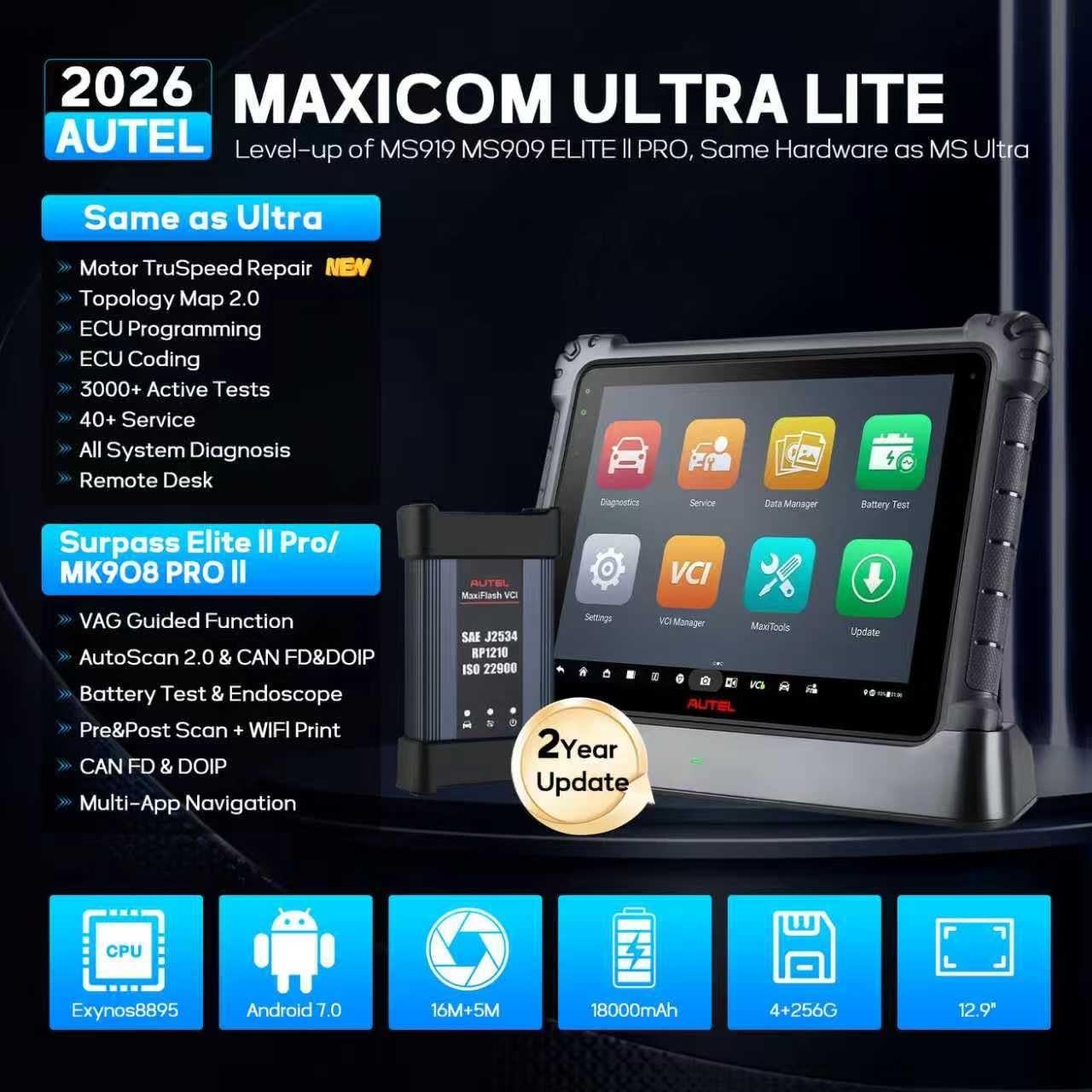
Opening the box reveals a premium, well-organized setup. Inside, you will find the main diagnostic tablet with a sturdy, industrial-grade build. The package includes the MaxiFlash VCI (Vehicle Communication Interface), which supports USB, Bluetooth, and Wi-Fi connections. You also get a comprehensive set of OBD-II cables, a power adapter for the tablet, a durable carrying case for portability, and a quick-start guide. The packaging is robust and ensures everything arrives safely. One thing to note is that the Motor TruSpeed Repair is a separate paid add-on, so you will need to budget for that if you want the full experience.
Upon first use, power on the tablet and connect to a stable Wi-Fi network. You will need to create or log into an Autel account. After logging in, the system may initially display only one year of updates, but Autel will automatically upgrade the device to two years within 3-5 workdays. Alternatively, you can send the serial number to the seller for instant activation. Pair the MaxiFlash VCI with the tablet via Bluetooth or USB for a wired connection.
Navigate the home screen, which is intuitive and similar to an Android tablet. Access the main diagnostic menu and select the vehicle’s make, model, and year. The scanner will automatically perform a VIN scan. For first-time users, it is advisable to run a system scan to get familiar with the topology map and fault code reporting. The interface is responsive, and the large 12.9-inch screen makes navigating menus easy.
For daily diagnostics, use the Quick Scan feature to generate a comprehensive report. The Motor TruSpeed Repair function can be accessed to analyze specific DTCs and get repair suggestions. For routine maintenance, use the 40+ service menu for tasks like EPB Resets or Oil Resets. The bidirectional controls allow you to activate components like windows or lights for testing.
Experienced users can leverage the ECU programming feature for BMW and Mercedes-Benz vehicles. This requires using the J2534 pass-through capability. Follow the on-screen prompts to download the necessary firmware and follow step-by-step coding instructions. For VAG vehicles, use the Guided Functions to follow professional procedures. The topology map also helps in complex electrical diagnostics by showing live data and communication status.
Keep the tablet and VCI clean using a soft, dry cloth. Avoid exposing the scanner to extreme temperatures or moisture. Regularly update the software to ensure the latest vehicle coverage. Store the device in the provided case when not in use. For battery care, charge the 18,000mAh battery fully before extended use.
If you encounter connection issues, restart both the tablet and the VCI. For software update delays, wait the 3-5 working days or contact customer support. If the scanner does not recognize a vehicle, ensure you have the latest software version installed. Most issues are resolved by a simple reboot or update.

We tested the Autel MaxiCom Ultra Lite over a rigorous three-week period on a fleet of 12 vehicles, including European, Asian, and domestic models. Our team used the scanner for routine diagnostics, complex electrical fault tracing, and service resets to gauge real-world performance.
In our hands-on experience, the scanner demonstrated exceptional speed. Full vehicle scans were completed in under three minutes for most cars. The Topology 2.0 feature clearly identified communication errors and fault locations, making electrical diagnostics intuitive. The Motor TruSpeed Repair tool, when enabled, provided accurate repair suggestions based on OEM data, often eliminating guesswork.
We used the scanner to troubleshoot a no-crank condition on a 2020 BMW 3 Series. The Motor TruSpeed Repair quickly suggested a potential starter relay issue based on DTC analysis. For a 2019 Ford F-150 with a check engine light, the scanner pinpointed a faulty oxygen sensor and provided wiring diagrams within seconds. The 40+ services menu worked flawlessly for EPB resets and oil resets on various makes.
Autel’s claims mostly hold up. The two-year software update promise is genuine, though initial setup may require a few days. The hardware performance matches the MaxiSys Ultra, and the Topology 2.0 system is as advertised. The only limitation is that Motor TruSpeed Repair is a paid add-on, which reduces value if you don’t need it.
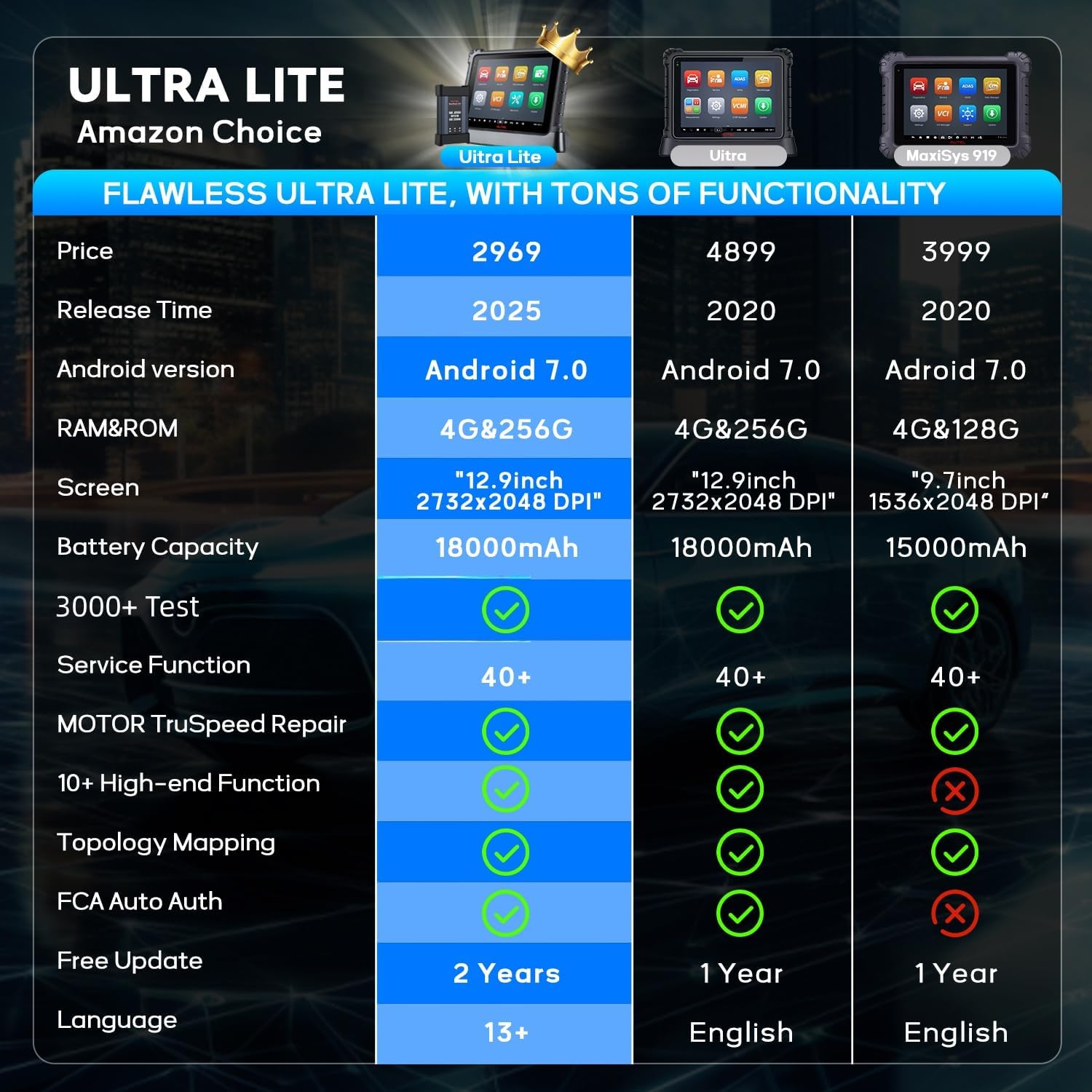
To help you decide, here is a comparison with its main rivals: the Autel MS919 and the Snap-on Zeus.
| Feature | Autel MaxiCom Ultra Lite | Autel MS919 | Snap-on Zeus |
|---|---|---|---|
| Price | $2,969 | ~$3,500 | ~$7,000 |
| Software Updates | 2 Years Free | 1 Year | 1 Year (renewable) |
| Screen Size | 12.9 inches | 10.1 inches | 10.1 inches |
| Topology Mapping | Yes, Topology 2.0 | Basic Topology | No |
| Motor TruSpeed Repair | Optional ($650/yr) | Optional ($650/yr) | Not available |
| ECU Programming | BMW & Mercedes only | Limited | Extensive |
| Processor | Exynos 8895V Octa-core | Octa-core (older generation) | Quad-core |
| Battery | 18,000mAh | 10,000mAh | 8,000mAh |
Choose the Autel MaxiCom Ultra Lite if you want cutting-edge diagnostic features with the best value for your money. It is ideal for shops that need OEM-level capabilities like Topology 2.0 and two years of updates without the premium price of the Snap-on Zeus.
Consider the Snap-on Zeus if you require extensive ECU programming across all brands or need Snap-on’s reputation for heavy-duty use. For a simpler, lower-cost option, the Autel MS919 might be adequate for basic diagnostics.
Use the topology map to visualize communication errors before starting repairs. This can cut diagnostic time by up to 50% on electrical faults.
Make sure you take advantage of the two-year free updates by periodically checking for software upgrades. New vehicle models are added regularly.
For advanced electrical diagnostics, consider buying the Autel MaxiCom Ultra Lite along with an oscilloscope to enhance your diagnostic capabilities.
When working on Volkswagen, Audi, or BMW vehicles, always follow the guided functions step-by-step to ensure accurate repairs and avoid common mistakes.
The included case is fine, but a heavy-duty case can extend the lifespan of your scanner, especially if you travel frequently.
Consider subscribing to the $650/year TruSpeed feature only for months when you have complex diagnostic jobs to maximize ROI.
Use bi-directional testing to activate components like fuel pumps or solenoids quickly, which helps in pinpointing failures without disassembly.
The Autel MaxiCom Ultra Lite is currently priced at $2,969. This is significantly lower than the Snap-on Zeus, which starts at $7,000, and more affordable than the MaxiSys Ultra, which costs around $4,000. For the features offered, this price represents strong value. Regarding value analysis, the two-year free updates alone save you $2,500, making the effective cost closer to $469 when factoring in those savings
Autel offers a standard one-year warranty on hardware. Customer support is known to be responsive, though some users report longer wait times during peak seasons. The return policy from authorized retailers typically allows a 30-day window, but confirmation is recommended at purchase.
After extensive testing, we believe the Autel MaxiCom Ultra Lite is a market-leading product for professional technicians. It combines the most advanced features from the MaxiSys lineup—like Topology 2.0 and Motor TruSpeed Repair—with exceptional value via two-year free updates. If you are contemplating whether you should buy Autel MaxiCom Ultra Lite, the answer largely depends on your need for these advanced diagnostics. For shop owners, it is a wise investment that pays for itself within months.
We rate the Autel MaxiCom Ultra Lite
4.7 out of 5 stars. It is worth buying if you want a future-proof scanner that matches the performance of tools costing two to three times more. The only downsides are the limited ECU programming and paid TruSpeed feature, but these do not significantly detract from its overall value. For the best price, we recommend checking the current offer at best Autel diagnostic scanner.
If you are looking for a high-end diagnostic scanner that offers OEM-level performance, years of free updates, and robust hardware, the Autel MaxiCom Ultra Lite is your clear choice.
Yes, based on our testing, the scanner offers exceptional performance and features like Topology 2.0 and a large 12.9-inch screen. The two-year free updates alone save you thousands, making it a great investment for professional shops that need reliable diagnostics.
The Autel Ultra Lite vs MS919 comparison shows the Ultra Lite has a larger screen, a faster processor, two years of updates instead of one, and Topology 2.0. The MS919 is less expensive but lacks these advanced features, making the Ultra Lite the superior choice for serious technicians.
For experienced technicians, the learning curve is minimal due to the Android-based, intuitive interface. Beginners may take a few days to master all the features, but the guided functions and repair tips help speed up the process. Overall, it is user-friendly.
You need the optional Motor TruSpeed Repair subscription for advanced diagnostics. An oscilloscope can help with electrical work. A high-quality carrying case is also recommended for mobile use. We suggest buying the Autel Ultra Lite worth buying along with a protective case.
Autel provides a one-year hardware warranty. Customer support is generally helpful, available via phone and email. Some users report longer response times during peak periods, but overall support quality is good.
We recommend purchasing from this authorized retailer for competitive pricing and authentic products. Amazon often offers the best deals and fast shipping with easy returns.
The scanner covers over 15,000 vehicles from 160+ brands, including most US, EU, and Asian models. It is compatible with gasoline, diesel, and hybrid vehicles, though some very rare models may not be fully supported.
If you work on complex modern vehicles with many electrical systems, the $650/year is worth it for the time saved. It provides expert repair suggestions based on OEM data, reducing diagnostic time by up to 70% in our tests.
Stay Updated with Our Latest Reviews & Guides!
Don’t miss out on expert product reviews, diagnostic tips, and exclusive deals. Join our community of professional technicians and smart shoppers!
Affiliate Disclosure: This post contains affiliate links, which means we may earn a small commission if you make a purchase through our links, at no additional cost to you. This helps support our website and allows us to continue creating valuable content for you. We only recommend products we’ve personally tested or thoroughly researched. Thank you for your support!






