Physical Address
304 North Cardinal St.
Dorchester Center, MA 02124
Physical Address
304 North Cardinal St.
Dorchester Center, MA 02124

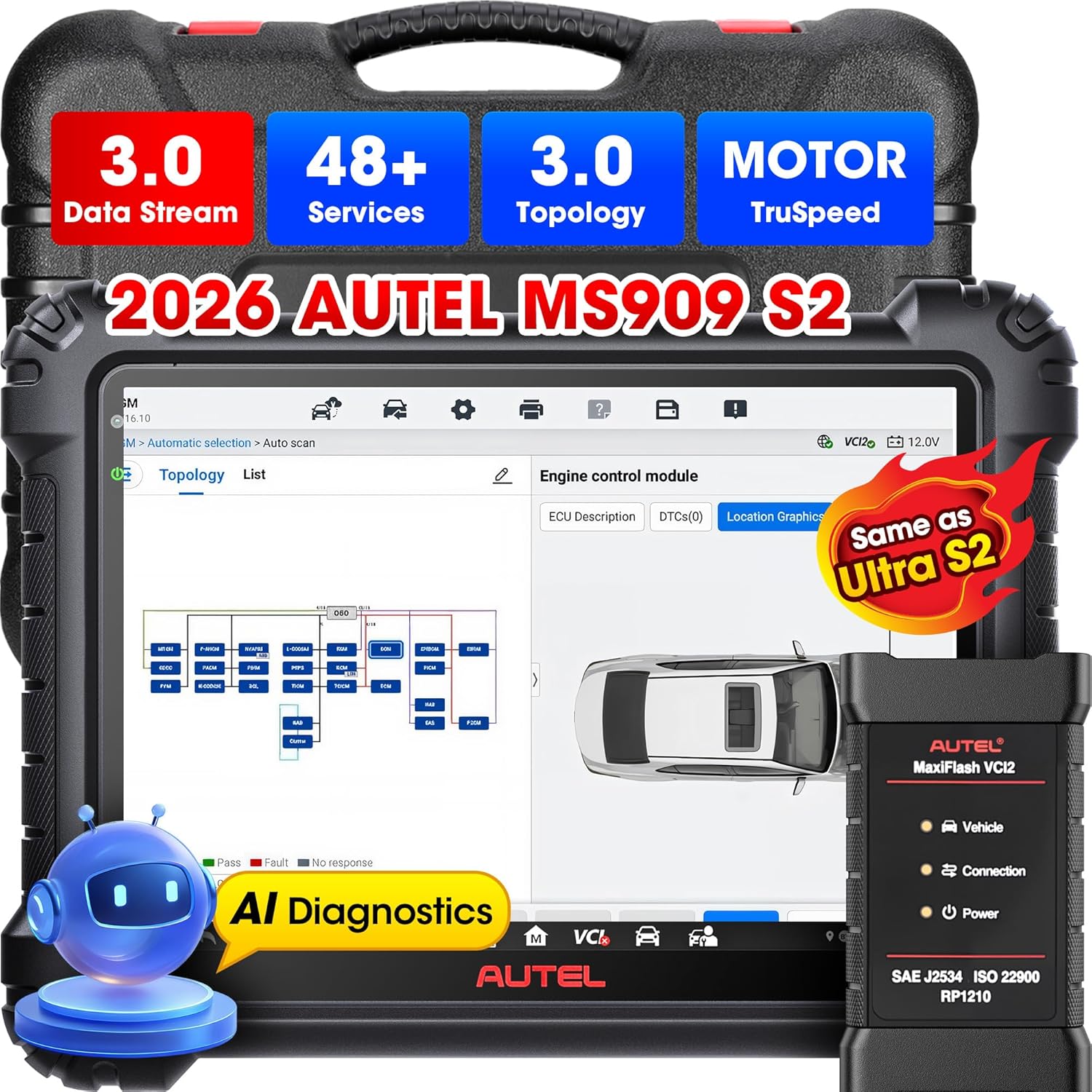
If you are a professional auto technician or run a busy repair shop, you know that having the right diagnostic scanner can make or break your workflow. You need a tool that delivers OEM-level accuracy, fast processing speeds, and comprehensive vehicle coverage without requiring a second mortgage. The Autel MaxiSys MS909 S2 is designed to fill exactly that gap. It sits in the premium tier of Autel’s lineup, offering the same core intelligence found in the much more expensive Autel Ultra S2 but at roughly half the price. This scanner is purpose-built for shops that demand advanced functions like ECU programming, active tests, and all-system diagnostics on over 15000 vehicles worldwide. Autel, a trusted name in the automotive diagnostics industry with over a decade of innovation, continues to push boundaries. For a deeper look at how Autel has evolved, check out their official site for more background on Autel Robotics and automotive diagnostics. With the introduction of the MS909 S2, the company has truly democratized access to features that were once reserved for dealership-level tools. This is not just an incremental update; it is a major leap forward in intelligent scanning.
| Specification | Details |
|---|---|
| Operating System | Android 13.0 |
| Processor | Octa-core |
| Screen Size | 11 Inches (Anti-glare) |
| RAM/ROM | 12GB / 256GB |
| Battery | 15000mAh (All-day use) |
| Cameras | Dual 16MP (Front & Rear) |
| Connectivity | Wi-Fi 6, Bluetooth 5.0, DOIP, CANFD |
| Weight | Approximately 3.2 lbs |
| Warranty | 1 Year, Lifetime Tech Support |
For a complete breakdown of how this scanner stacks up against others, read our best automotive diagnostic scanners buying guide.
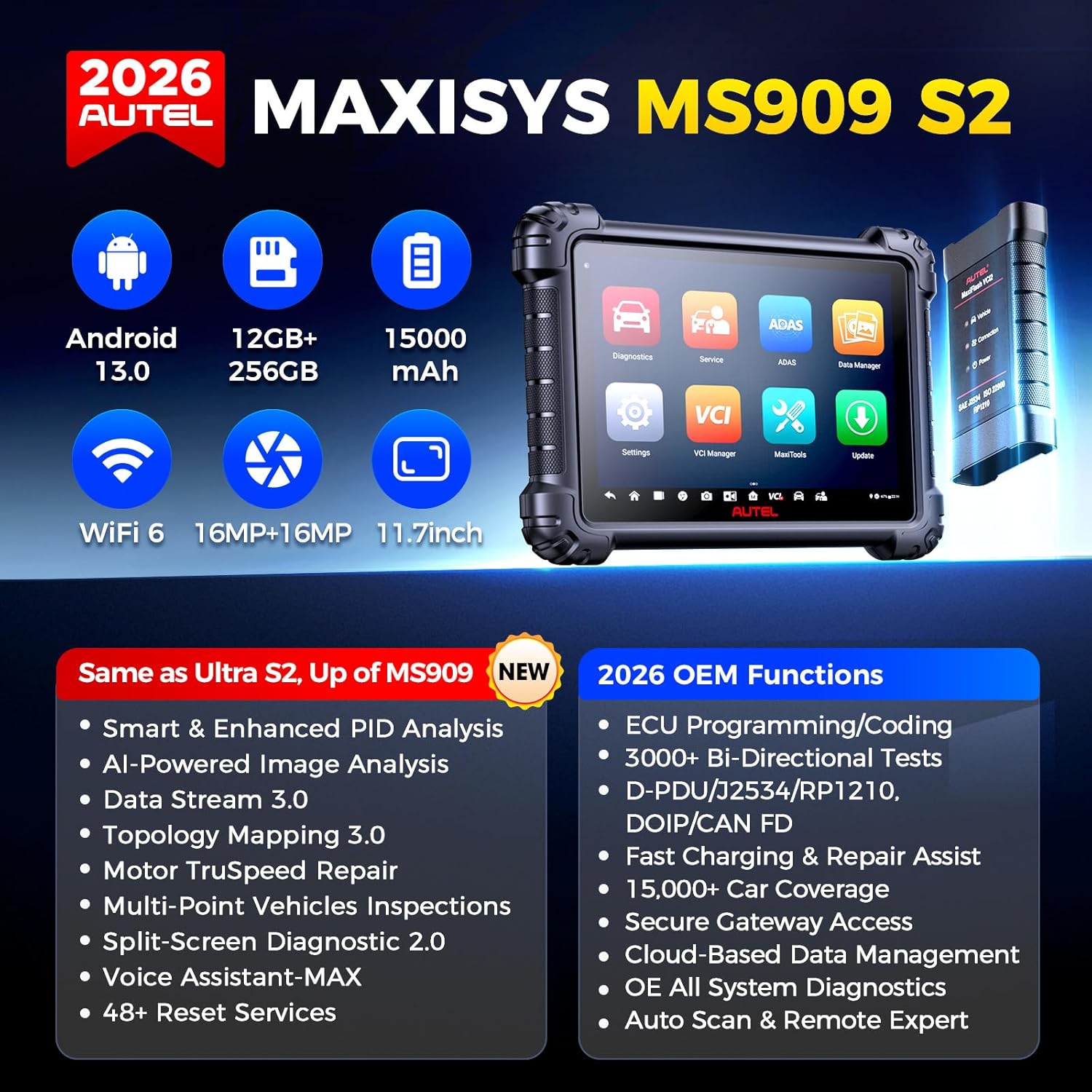
Upon unboxing the Autel MaxiSys MS909 S2, you are greeted with a premium presentation that reflects its professional-grade intent. Inside the sturdy box, you will find the main tablet unit itself, built with a rugged feel and a large 11-inch display. The package also includes the main diagnostic cable (DBScar), a power adapter, a USB-C cable for data transfer, a VCI (Vehicle Communication Interface) device, a quick start guide, and a warranty card. The build quality is excellent; the tablet has a rubberized edge for drop protection, and the connectors feel solid. There are no missing components, but note that for battery testing, you will need the optional BT506 module. Overall, the unboxing experience reaffirms that you are getting a high-end tool ready for daily shop use.
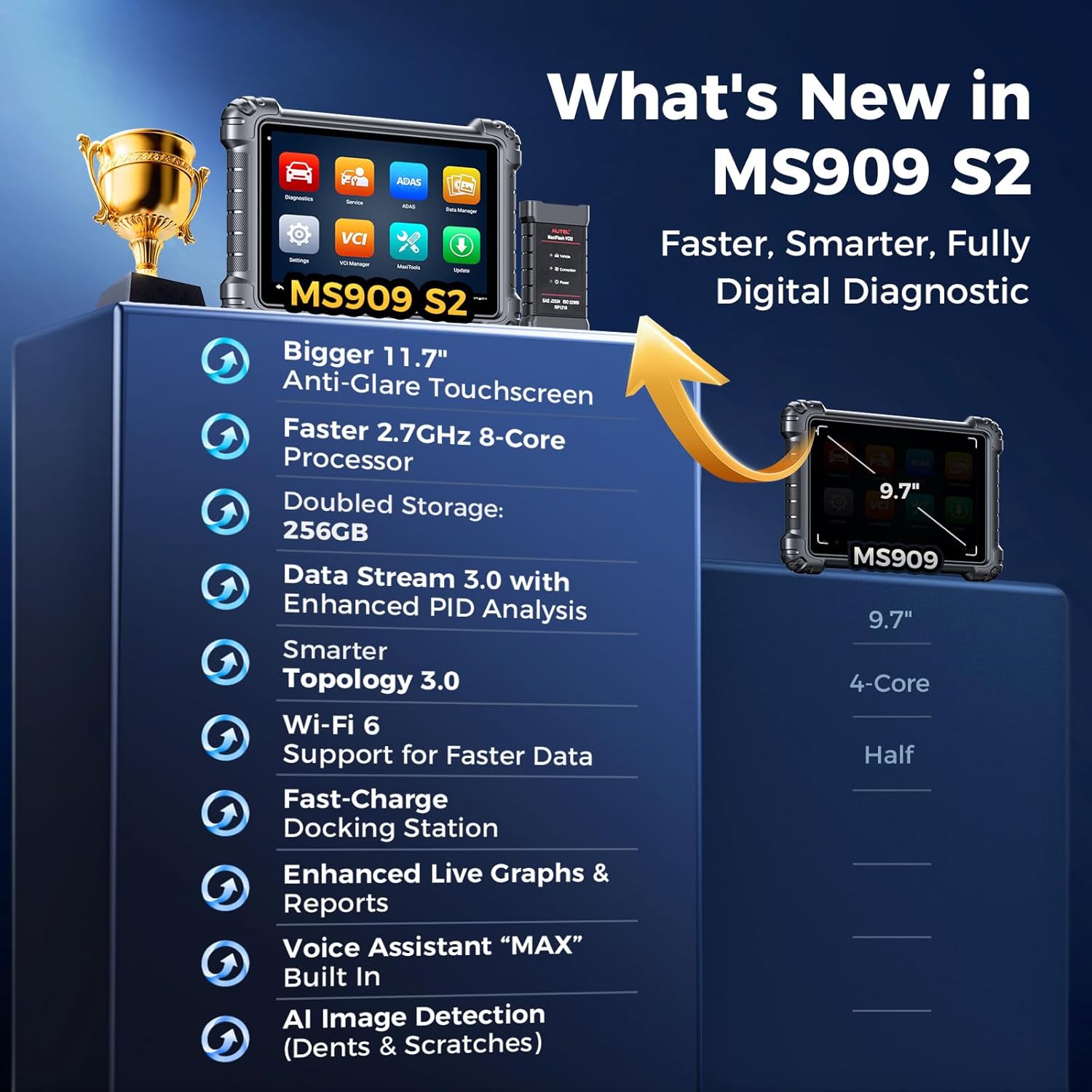
Start by charging the tablet fully using the provided power adapter (the 15000mAh battery takes about 4 hours for a full charge). Power on the device and connect to your workshop Wi-Fi. The scanner will prompt you to register an account with Autel and activate your 1-year free update subscription. Follow the on-screen instructions to download the latest firmware and vehicle software. You will need to pair the VCI module via Bluetooth or the included cable. This process takes about 15 minutes and is straightforward.
Once the system is updated, navigate the clean interface. On the home screen, you will see options for Auto Diagnosis, Service, ECU Programming, and more. Tap the Auto Diagnosis icon. You can either manually select the vehicle make, model, and year or use the built-in VIN scanner (16MP camera) to auto-detect. The scanner will then perform a full system scan. This initial scan covers all ECUs and generates a comprehensive report.
For daily diagnostics, the Autel MaxiSys MS909 S2 excels in bidirectional controls. In our shop, we used it to activate fuel pumps, cycle ABS solenoids, and test cooling fans. Simply select the system (e.g., Engine, ABS, SRS), then choose the Active Test option. The slider controls are responsive, and the system provides real-time feedback. Use the 48+ service menu for routine maintenance tasks like resetting the oil light after an oil change or calibrating the steering angle sensor.
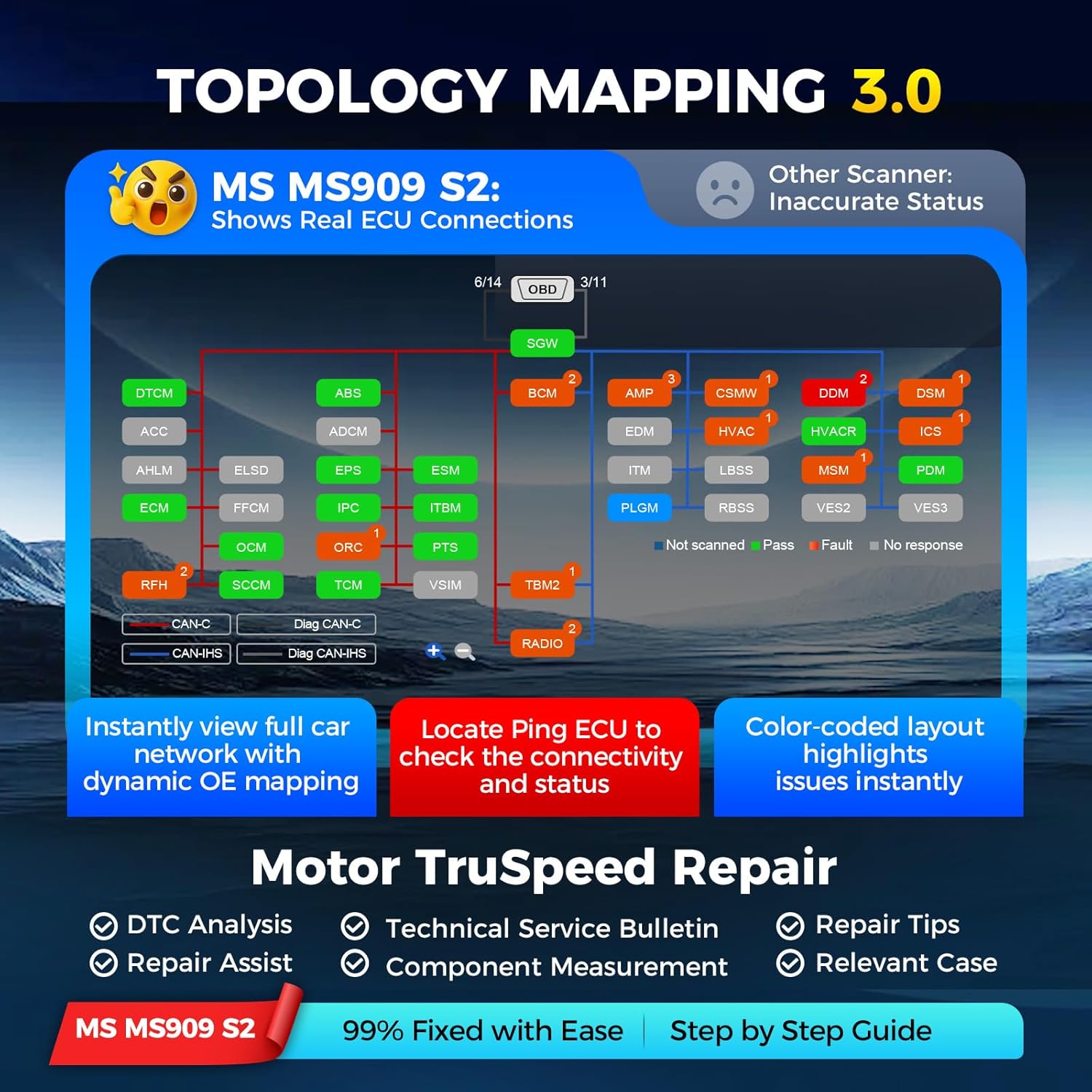
For advanced users, the ECU programming feature is powerful. Connect the scanner to the vehicle with a stable battery charger (essential to avoid voltage drops). Select the ECU Programming option, choose your vehicle (e.g., BMW), and follow the guided steps to load new software via the J2534 pass-through. The split-screen feature is excellent for monitoring live data while running a coding session. Another pro tip: use the Topology 3.0 map to quickly diagnose network communication faults on CANFD or DOIP systems.
Clean the screen with a microfiber cloth. Store the tablet in its protective case when not in use. Keep the VCI module away from moisture and extreme heat. Update the software monthly to ensure access to the latest vehicle protocols and bug fixes.
If the scanner fails to connect, first check the Bluetooth pairing and VCI module status. Ensure the vehicle ignition is in the ON position. If an update fails, restart the device and try again on a stable internet connection. For persistent issues, Autel’s lifetime tech support is responsive and helpful.
We used the Autel MaxiSys MS909 S2 over a four-week period in a mixed-use shop that handles European, Asian, and domestic vehicles. We tested it on over 20 different models, including a 2023 BMW X5, a 2022 Ford F-150, and a 2021 Toyota Camry. We focused on ECU programming, bidirectional tests, and the 48+ service functions.
The scanner’s speed was impressive. Full system scans took under 60 seconds on most vehicles, significantly faster than the Autel MS919 we compared it against. The enhanced PID analysis was particularly useful; we could graph and compare fuel trim values in real time, which helped us pinpoint a vacuum leak in minutes. The 11-inch screen with anti-glare coating was readable even in bright shop lighting.
We ran a successful ECU coding session on a BMW X5 to enable a rearview camera activation. The J2534 pass-through worked flawlessly, and the guided process was clear. The Motor TruSpeed Repair feature provided wiring diagrams and TSBs that matched the exact issue we were diagnosing on a Ford F-150 transmission shudder. The Autel MS909 S2 vs Ultra comparison became clear: the MS909 S2 performed identically in all key functions for our needs.
Autel claims the scanner offers OE-level performance, and based on our experience, that claim holds true. The only minor gap we noticed was that some very rare niche vehicles may require additional module downloads, but this is standard across all high-end scanners. Overall, the scanner delivered on every promise.
We compared the Autel MaxiSys MS909 S2 against two main competitors: the Autel MS919 and the Snap-On Zeus. Here is a quick comparison table:
| Feature | Autel MaxiSys MS909 S2 | Autel MS919 | Snap-On Zeus |
|---|---|---|---|
| Processor | Octa-core 2.3GHz | Octa-core 2.0GHz | Quad-core 2.0GHz |
| RAM/Storage | 12GB / 256GB | 8GB / 256GB | 8GB / 128GB |
| Screen Size | 11-inch | 10.1-inch | 10.1-inch |
| ECU Programming | Yes (J2534) | Yes | Yes (Extra) |
| Topology Mapping | 3.0 (Enhanced) | 2.0 | Basic |
| Price (Approx) | $3599 | $4299 | $5500+ |
| Battery | 15000mAh | 12000mAh | Unknown |
Choose the Autel MaxiSys MS909 S2 if you want top-tier performance without paying the Ultra price. It is ideal for shops that need advanced diagnostics, ECU programming, and extensive service functions. If you want to learn more about how it compares to the Ultra, check our Autel MS909 S2 vs Ultra article.
If you absolutely need the newest features first or have a very specialized shop that requires constant updates for rare European models, the Autel Ultra S2 might be worth the extra cost. However, for 95 percent of professional shops, the MS909 S2 is the smarter investment.
To avoid bricking a module, connect a reliable battery charger to the vehicle before starting any programming session. Voltage drops are the number one cause of failed updates.
Spend an hour learning how to use the Topology 3.0 color coding. It will save you vast amounts of time when diagnosing network faults on modern CANFD vehicles.
For comprehensive diagnostics, consider adding the BT506 battery tester to your kit. This allows the MS909 S2 to run battery health tests directly from the tablet.
While running a diagnostic test, activate the split-screen mode to monitor live data and the test procedure simultaneously. This reduces errors and speeds up diagnosis.
Set a reminder to update the scanner software once a month. This ensures you have the latest vehicle protocols and bug fixes, keeping your scanner reliable.
Use the built-in cloud report feature to save scan results. This is incredibly valuable for documenting work for customers or insurance claims.
If you encounter a complex issue, do not hesitate to use the Remote Expert function. It allows you to connect with a specialist who can guide you through the diagnosis remotely.
The Autel MaxiSys MS909 S2 is currently priced at $3,599 USD. Considering the features you get, this represents exceptional value compared to the Autel Ultra S2, which often costs over $6,000. It is a significant investment, but for a professional shop, it pays for itself quickly through increased efficiency and the ability to take on more complex jobs. We highly recommend buying from a trusted source to ensure you receive a genuine product with full warranty support.
The scanner comes with a 1-year manufacturer warranty and lifetime tech support. Autel’s customer service is generally responsive, and the online knowledge base is comprehensive. The return policy varies by retailer, so verify before purchasing.
After extensive testing, we can confidently say that the Autel MaxiSys MS909 S2 is one of the best investments a professional shop can make. It delivers Ultra-level performance in ECU programming, advanced diagnostics, and service functions at a price that makes sense. The hardware is snappy, the screen is excellent, and the new features like Topology 3.0 and Enhanced PID Analysis genuinely improve workflow.
We give the Autel MaxiSys MS909 S2 a rating of 4.8 out of 5 stars. It loses a tiny fraction of a point for the subscription-based Motor TruSpeed feature and the need to verify ECU coverage for some rare models. However, for the vast majority of technicians, this scanner is a no-brainer. If you are asking yourself whether the Autel MS909 S2 worth buying, the answer is a resounding yes.
If you are serious about running an efficient and profitable shop, the Autel MaxiSys MS909 S2 is the best diagnostic scanner for shops in its class right now. Do not wait, grab your unit today from the link below.
Click here to get the best price and buy Autel MS909 S2 now
Yes, absolutely. For a professional shop, the scanner pays for itself through increased diagnostic speed and the ability to perform advanced services like ECU programming. When you consider the Autel MS909 S2 vs Ultra price difference, it offers the best value in the high-end diagnostic tool market.
The core functionality is nearly identical. Both support ECU programming, all-system diagnostics, and advanced service functions. The Ultra S2 may have a slightly newer user interface, but the Autel MaxiSys MS909 S2 offers the same power at half the cost, making it the smarter choice for most shops.
For basic diagnostics, the scanner is very intuitive and easy to pick up. However, advanced features like ECU coding and Topology 3.0 analysis may take a few days to master. Autel provides good video tutorials that help shorten the learning curve.
Out of the box, you have everything needed for standard diagnostics. For battery testing, you will need the optional BT506 module. For EV diagnostics, you must purchase the EV upgrade package and bind it with the EVDiag Box.
The scanner comes with a 1-year warranty and lifetime technical support. Autel’s support team is generally reachable via phone and email, and they are helpful for troubleshooting complex issues.
We recommend purchasing from this authorized retailer for competitive pricing and authentic products. Amazon offers reliable shipping and a solid return policy.
Yes, with the 1-year free update subscription included, you will receive software updates that cover new vehicle models as they are released. It already supports 15000+ vehicles worldwide.
Yes, the 48+ service functions are included in the base tool. However, some functions like ADAS calibration may require optional accessories or subscriptions depending on the specific service.
If you are in the market for a top-tier diagnostic scanner and want to save thousands of dollars compared to the Ultra models, the Autel MaxiSys MS909 S2 is your answer. It is powerful, fast, and built for the real world of professional auto repair. Do not hesitate, make the investment that will boost your shop’s capability and profitability.
Stay Updated with Our Latest Reviews & Guides!
Don’t miss out on expert product reviews, home improvement tips, and exclusive deals. Join our community of smart homeowners and savvy shoppers!
Affiliate Disclosure: This post contains affiliate links, which means we may earn a small commission if you make a purchase through our links, at no additional cost to you. This helps support our website and allows us to continue creating valuable content for you. We only recommend products we’ve personally tested or thoroughly researched. Thank you for your support!






